
Voice-to-text wherever your cursor is — no integrations, no plugins.
01Audio
02Transcription
Let's meet tomorrow at ten at the café … no, actually, Friday at three in the afternoon on a video call.
03Polishing
Tomorrow, 10:00, at the café
Instead: Friday, 3 pm, video call.
04Final text
Let's have a video call on Friday at 3 pm.
Built for macOS · Made in GermanySpeak.
Speak.
Sophist writes.
The speech-to-text companion for modern office workers — one shortcut, every app, polished prose. Plus meetings, teleprompter and coaching.
No account or subscriptionDownload Sophist for free and use it without word limits.
Use your own API keysConnect your preferred supported providers with your own credentials.
Free local providersDownload local speech models easily and use them at no cost.
DONE
Everything you need
✓
✓
✓
✓
✓
✓
✓
✓
✓
✓
✓Tasks
✓Notes
✓
✓
Built with ❤️ in Germany.
Choose local models — your voice data stays on your Mac.
Answers from your own documents.
Why professionals choose Sophist
Works in every macOS app
Dictation
Cloud or local depending on your needs.
Meetings
Live transcription and translation, including reports. After the meeting, the Meeting Coach tells you what went well and what you can improve. Meeting minutes can also include screenshots of the presentation shown.
Tasks and Notes
Let AI create your tasks directly after a meeting. You can also dictate tasks and notes anytime using Command Mode.

See how Anna works with Sophist all day long
From her first dictation to her final task, Sophist helps Anna boost her productivity throughout the day. Six chapters, one workday.

Emails in Command Mode
Anna simply dictates her intent and Sophist turns it into polished emails.Instead of writing every reply word by word, Anna states what she wants to achieve: “Confirm the meeting with Mr. Weber, ask for the documents by Friday and keep it friendly.” Sophist understands the context, picks the right tone and writes the finished email straight into her mail client – in any app, without plugins. Her inbox is done three times faster and the day starts relaxed.
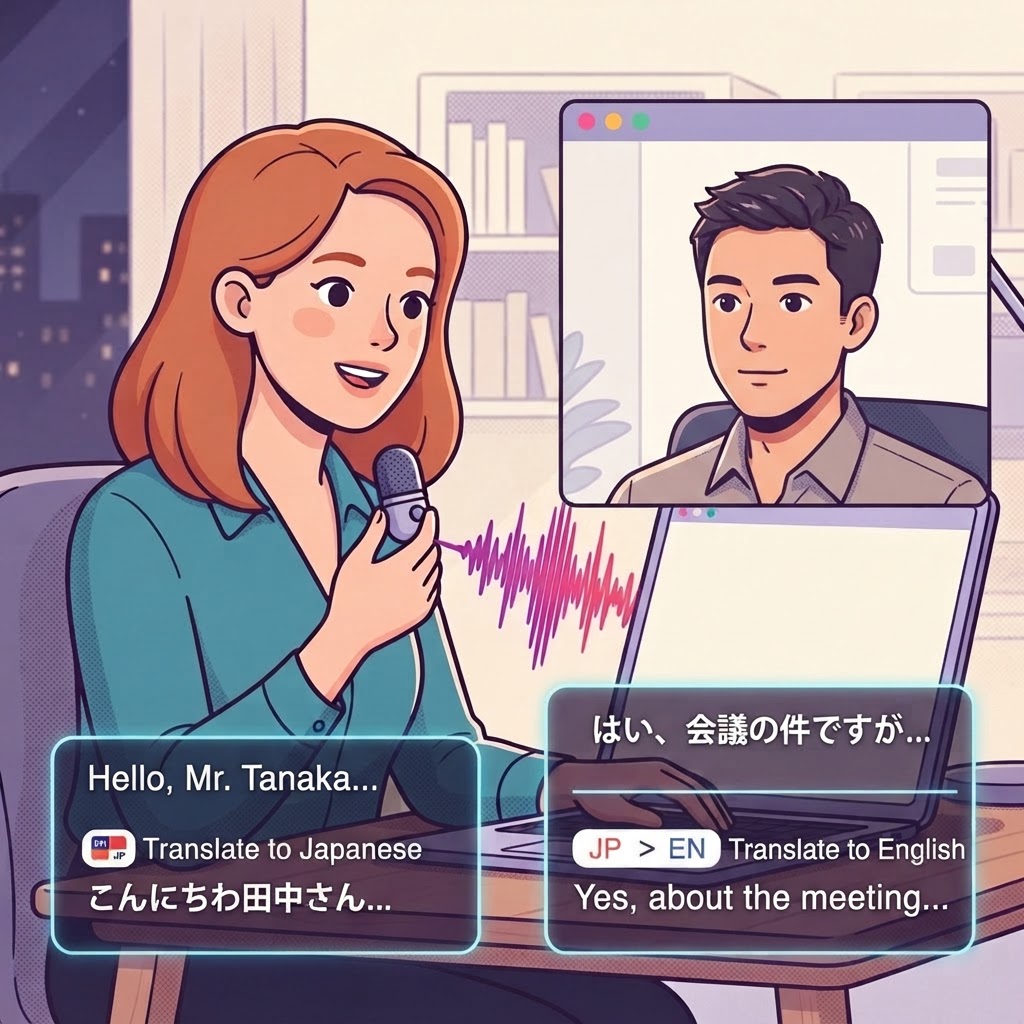
Meetings without barriers
A meeting with her Asian partner is transcribed and translated live.During the video call with her partner in Singapore, Sophist runs quietly in the background. Everything said appears as a live transcript, optionally translated on the fly. Anna can focus entirely on the conversation instead of taking notes – and misunderstandings caused by jargon or accents are a thing of the past.

Capture important slides
With one shortcut Anna saves exactly the slides she will need later.Whenever a key figure or chart appears, Anna presses a shortcut. Sophist stores a timestamped screenshot of the slide within the meeting and links it to the matching passage in the transcript. There is no need to ask the partner for the deck afterwards – the minutes will contain precisely the visuals that matter.

Meeting minutes & task insights
Sophist creates the minutes with screenshots and identifies Anna's next steps.After lunch the minutes are ready: summary, decisions, open questions and the saved slides in the right place. Task Insights filter out the commitments Anna made herself and add them to her task list with due dates. The Meeting Coach adds what went well in the conversation and where she can be even clearer next time.

What is still due today?
Before finishing work, Anna reviews today's tasks and postpones the less important ones.A glance at the task list shows what is still open today. By voice, Anna moves two items to tomorrow – “Push the budget note to Monday” – and stumbles upon an entry she dictated weeks ago: the birthday surprise for her partner. Without Sophist, the idea would have been forgotten long ago.

Surprise booked
Alone and unnoticed, Anna books the wellness weekend – dictating the email to the hotel with Sophist.Her colleagues have already left, so Anna takes care of the booking in peace. The request to the hotel is created in Command Mode once again, including the preferred dates and a question about a room upgrade. Two minutes later the email is sent, the task is checked off and the workday ends – with the good feeling of having forgotten nothing.
Speak naturally.
Sound professional.
Sophist removes filler words, fixes grammar, and structures your thoughts — automatically.
EmailSlack messageBusiness email
You speak
“umm hey, so about the the meeting tomorrow, I think we should probably push it back because, you know, the client hasn't sent the the docs yet and like, it doesn't really make sense to meet without them I guess”
Sophist writes
Hey, regarding tomorrow's meeting — I think we should push it back. The client hasn't sent the documents yet, so it doesn't really make sense to meet without them.
Slack message
You speak
“okay so for the the bug, I think it's in the auth handler, like when the token expires it's not refreshing properly so we need to add a check there and then maybe also log it”
Sophist writes
The bug appears to be in the auth handler — when the token expires, it's not refreshing properly. We need to add a check there and add logging for it.
Business email
You speak
“hi Mr. Schmidt, thank you for for reaching out, regarding your your inquiry about the licensing terms, I'd be happy to set up a call next week to to discuss the details”
Sophist writes
Dear Mr. Schmidt, thank you for reaching out regarding your inquiry about the licensing terms. I'd be happy to set up a call next week to discuss the details.
Explore the features
01
Dictation Mode
Your voice, your rules.
Meet your personal dictation assistant. Configure your shortcut once, then simply hold it down and speak — your words appear exactly where your cursor is, in any app.
Two Ways to Dictate
Push-to-Talk — hold your shortcut, dictate, release. Freehand Mode — press once to start, speak as long as you need, press again to stop.
Best-in-Class Speech Models
Online models (Soniox, ElevenLabs) with Key Terms support. Offline models (FluidAudio, Whisper, Apple) for full privacy — no internet required.
AI Post-Processing
Set per-app AI processing prompts. Professional tone in Odoo, casual in WhatsApp — all automatic.
ToMaya Thompson
Follow-up and next steps for our project
Hi Maya,
Thank you for the productive conversation today. I have summarized the key decisions and will send the revised timeline by tomorrow afternoon.
The implementation team can begin with the first phase next Monday
LIVE DICTATION
The implementation team can begin with the first phase next Monday, while we prepare the remaining materials and confirm the final milestones.
AI
02
Compose Mode
Stop typing. Start commanding.
You're no longer dictating text — you're telling Sophist what to do. Describe what you need, and Sophist handles the rest.
Write Emails With Your Voice
Explain the key points in plain language, and Sophist drafts a polished, professional email — ready for you to review and send.
Add Documents for Instant Context
Copy any document to your clipboard, then activate Compose Mode. Sophist reads it, extracts the essentials, and weaves them into a professional message.
Built for Sales & Service Teams
Reference product documentation on the fly. Combine multiple sources into a single, coherent response — all by voice.
ToMaya Thompson
Project kickoff and next steps
Hi Maya,
Thank you for the productive conversation today. We are ready to begin the first phase next Monday. I will send the revised timeline and remaining materials by tomorrow afternoon.
Best regards,
LIVE DICTATION
Write a concise, professional follow-up email to Maya confirming that the implementation team can begin next Monday and that I will send the revised timeline tomorrow.
AI
03
Agentic Mode
Your knowledge, on demand.
Connect Sophist to your own knowledge base. Pull up exactly the information you need — woven directly into your text.
Set Up in Minutes
Upload your documents — product manuals, legal references, technical specs. All data is processed and stored locally on your Mac.
Activate With "Hey Anna"
Press your Command Mode shortcut and say "Hey Anna." From that moment, Sophist retrieves information from your knowledge base instantly.
From Legal Clauses to Technical Procedures
Need a specific paragraph inserted verbatim? Product specifications from a data sheet? Just ask.
ToMaya Thompson
Enterprise plan: security and support
Hi Maya,
Thank you for your interest in our Enterprise plan. According to our product knowledge base, it includes single sign-on, priority support with a two-hour response target, and an optional on-premise deployment for maximum data control.
I would be happy to arrange a technical consultation.
LIVE DICTATION
Hey Anna, write Maya a professional email explaining the security and support features included in our Enterprise plan, using our product knowledge base.
AI
04
Meeting Recorder
Every word. Every language.
Record meetings — in the room or online — and get a clean transcript with speaker turns, a summary and action items. Translated on the fly into the language you need.
Record Anything
Zoom, Teams, Meet or the conference table — Sophist captures system audio and microphone at once.
Live Translation
Follow a Spanish call in German. Transcripts and summaries in any language, while the meeting is still running.
Summaries & Action Items
Decisions, to-dos and open questions are extracted automatically the moment the meeting ends.
Meeting in progress
00:22✦ After the meeting, the transcript is refined and speakers are identified.
Original
Speaker 1:The launch plan is nearly complete. Let's review the final milestones before Friday.
Speaker 2:I'll confirm the timeline with the design team this afternoon.
German
Sprecher 1:Der Einführungsplan ist fast fertig. Lassen Sie uns die letzten Meilensteine vor Freitag prüfen.
Sprecher 2:Ich bestätige den Zeitplan heute Nachmittag mit dem Designteam.
05
Smart Teleprompter
It listens. It follows.
Paste your script and present. The teleprompter hears what you say and advances the text in sync — no foot pedal, no scrolling, no lost lines.
Voice-Synced Scrolling
The text moves at exactly your pace. Pause, and it waits. Speed up, and it keeps up.
Improvise Freely
Skip a sentence or add one — the prompter finds your place again and carries on.
Floating & Discreet
A slim overlay above any app, invisible to screen sharing and recordings.
Welcome to our product update.
Today we are introducing a faster way to turn ideas into finished work.
The new workflow makes every handoff feel effortless.
Notes, meetings, and follow-up tasks now stay together in one clear place.
Let's begin with the changes your team can use immediately.
06
Souffleur
Whispers the answer.
A prompter for your meetings: Souffleur listens along and, whenever a question comes up, quietly surfaces the answer from your knowledge base.
Listens in Real Time
Detects questions in the conversation — from customers, colleagues or partners.
Answers From Your Documents
Pricing, specifications, contract clauses — straight from your own library, with the source.
Only You See It
A discreet overlay on your screen. Nothing is shared, nothing is sent to the other side.
SouffleurListening
Guide 0/7
- Confirm objectives and decision criteria
- Review the current workflow
- Identify the biggest bottlenecks
- Define security requirements
- Discuss the rollout timeline
- Clarify success metrics
- Agree on next steps
The customer asks whether sensitive recordings can remain on-device.
- Local transcription keeps audio and text on the Mac
- Cloud processing can be disabled for selected workflows
The team wants to know how quickly a pilot can be introduced.
- Pilot setup: one afternoon for a small team
- Rollout: templates and shortcuts can be shared centrally
07
Meeting Coach
Better with every call.
After the meeting, the coach reviews how it went: talk-time balance, filler words, pace, unanswered questions — and gives you concrete tips for next time.
Talk Time & Pace
See how much of the meeting you spoke, how fast, and where the other side went quiet.
Filler Words & Clarity
Which phrases you repeat, where you lost the thread, and which questions stayed open.
Actionable Feedback
Three concrete things to do differently next time — not a report, a plan.
Project Review · September 5, 20263 speakers · 38 min
TranscriptMy NotesSummaryScreenshotsAction ItemsCoach
Overall impression
You guided the conversation with a calm pace and gave the team room to explain their concerns. Your questions created clarity, while the closing could have defined ownership more precisely.
Strengths
- Clear opening: You established the purpose and expected outcome in under a minute.
- Thoughtful follow-ups: You reflected key points before moving to the next topic.
Opportunities
- Shorten long explanations: Pause after the core message and invite a response.
- Confirm next steps: Assign an owner and deadline to every decision.
08
Text Actions
Not just dictation. Full text editing.
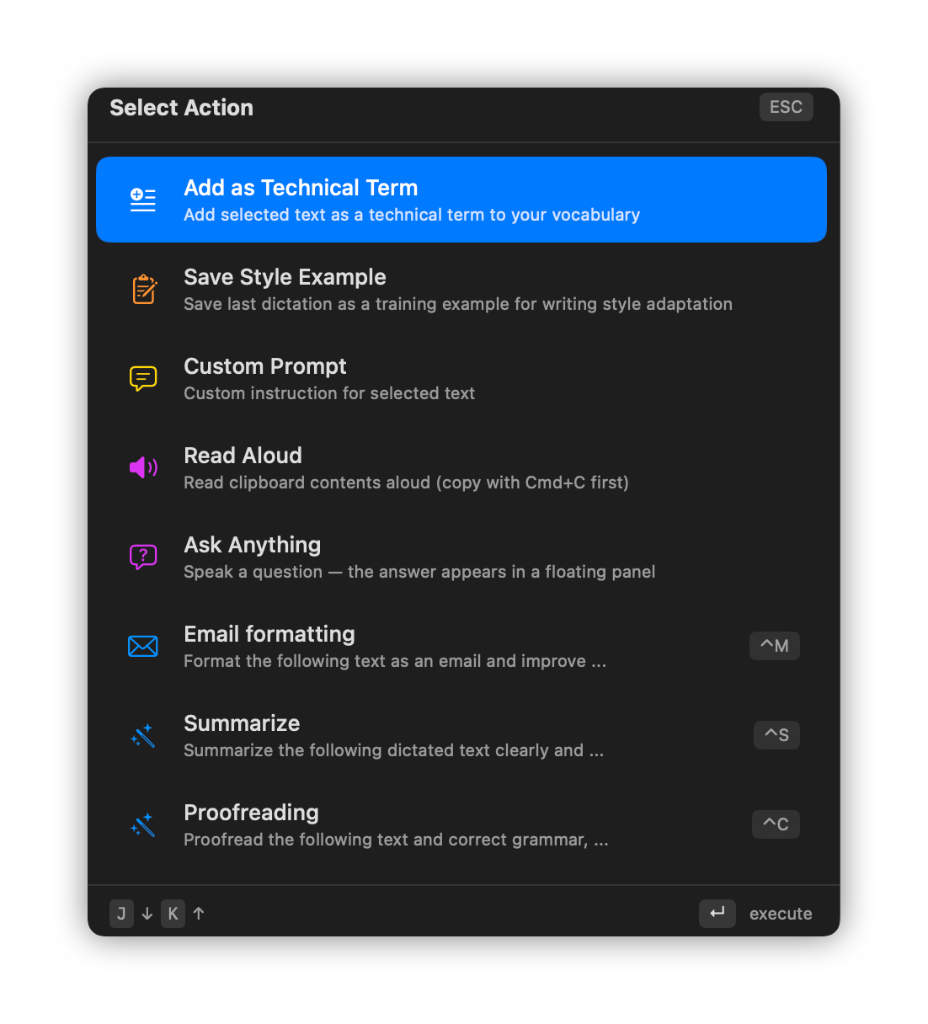
Sophist edits any text you select — in any app, via hotkey. Open the action palette, pick an action, done. Translate, proofread, improve, reformat: your text, transformed in seconds.
Ready-Made Actions
Translate, proofread, improve, summarize, format as email or read aloud — all one keystroke away.
Your Own Prompts
Create custom actions with instructions such as rewriting in your company tone or simplifying text for customers.
Hotkeys for Everything
Assign a shortcut to any action. Select text, press the hotkey, and the polished result replaces it instantly.
09
Superhuman Mail
New in 1.67. Hey Anna works right inside your inbox.
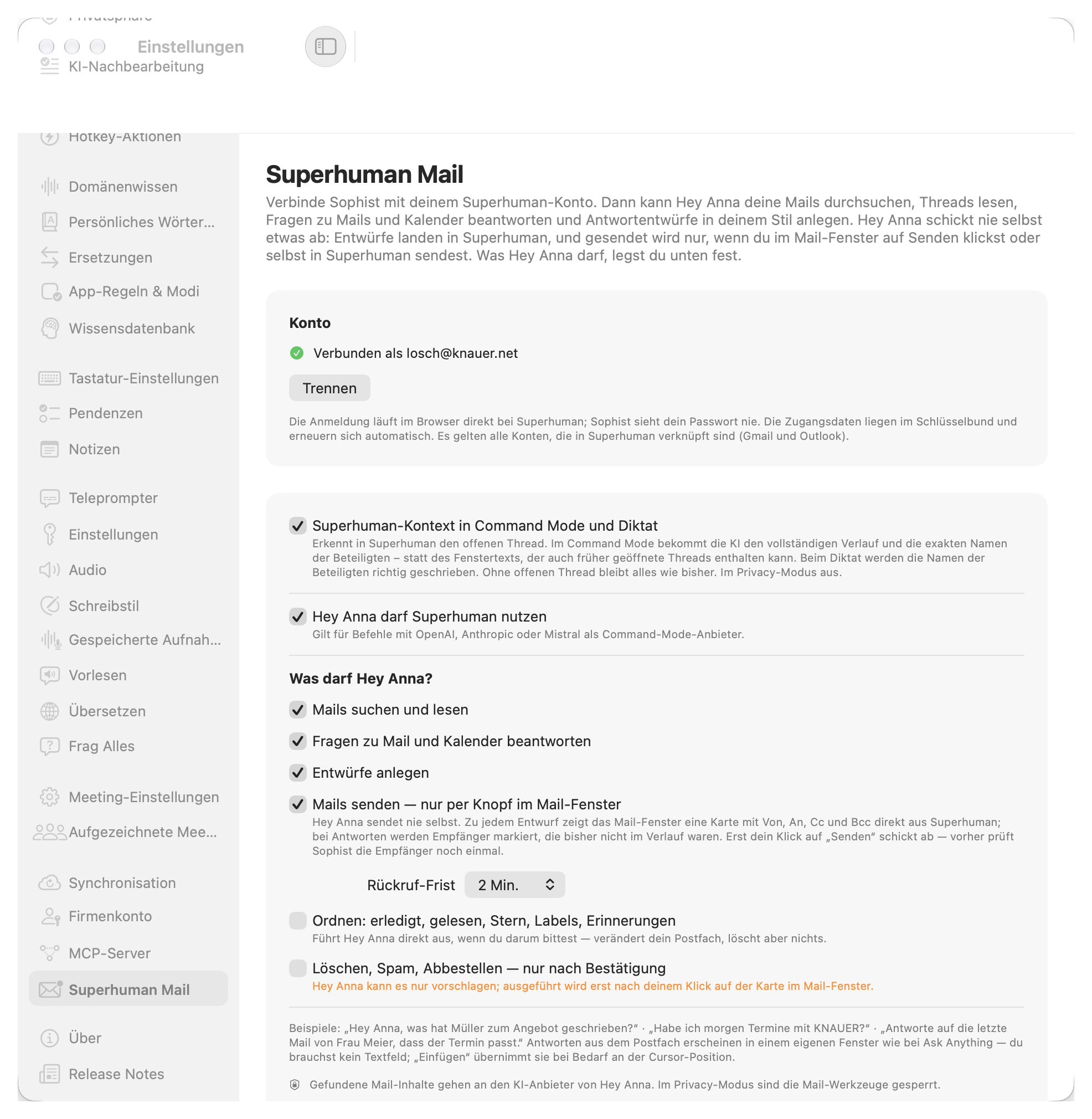
Connect Sophist to your Superhuman account. Hey Anna searches your email, reads threads, answers questions about mail and calendar and drafts replies in your style. She never sends on her own.
Search, read, ask
"Hey Anna, what did Miller write about the offer?" Works with all Gmail and Outlook accounts linked in Superhuman.
Drafts with full control
Every draft shows From, To, Cc and Bcc. New recipients are highlighted, and only your click sends, with an undo window you choose.
Context in Compose Mode & dictation
Sophist recognizes the open thread, gives the AI the full conversation and spells every participant's name correctly.
10
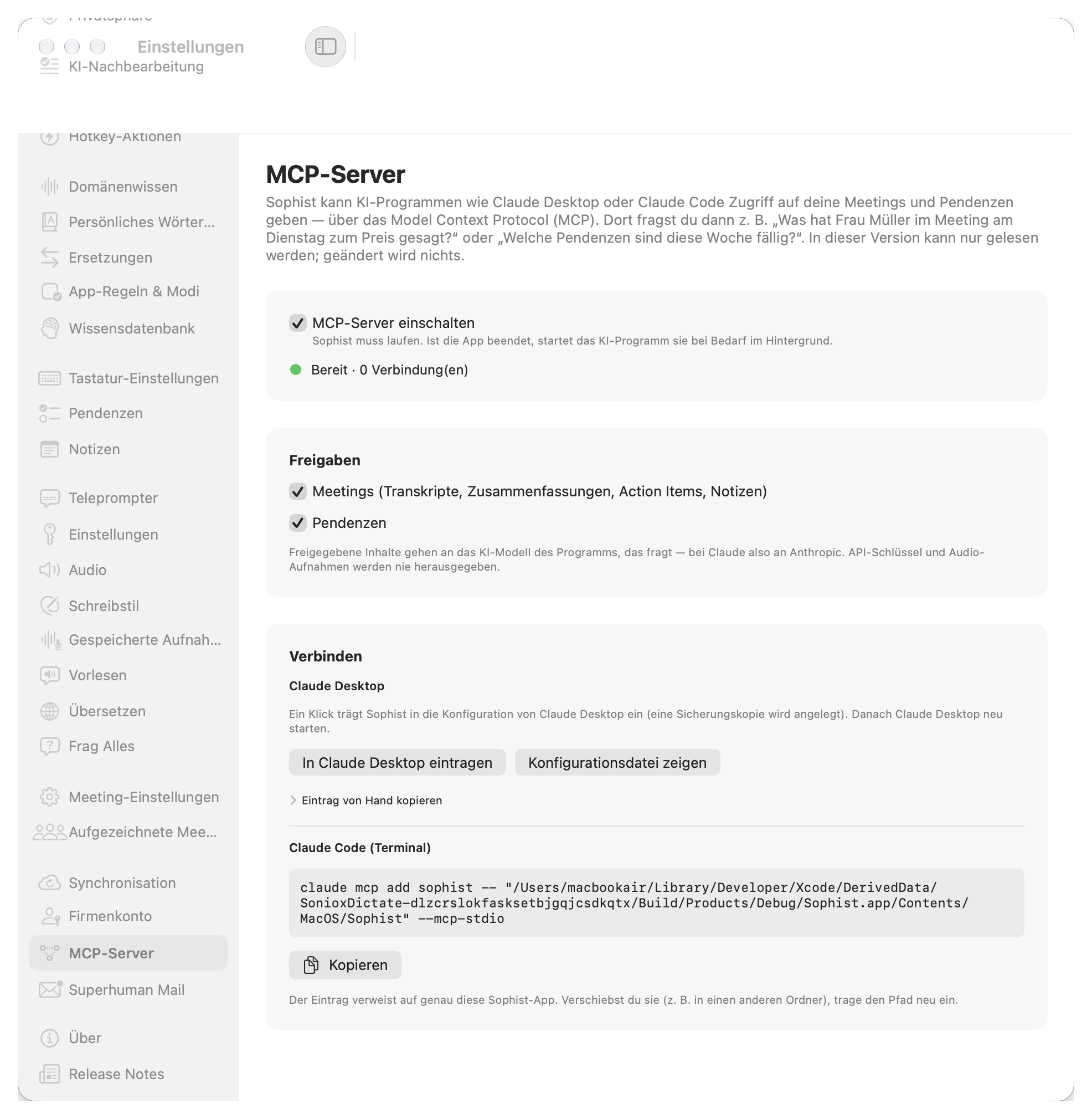
MCP Server for Claude
New in 1.67. Your meetings and tasks, available in Claude.
Sophist shares your meetings and tasks with Claude Desktop and Claude Code. Ask: "What did Ms Miller say about the price in Tuesday's meeting?" or "Which tasks are due this week?"
You choose what to share
Meetings (transcripts, summaries, action items, notes) and tasks.
Set up in one click
One click adds Sophist to Claude Desktop. For Claude Code there's a ready-to-copy command.
Read-only and private
API keys and audio recordings are never shared, and in Privacy Mode nothing is shared.
Compatibility
Every app. One shortcut.
Voice-to-text wherever your cursor is — no integrations, no plugins.
 Gmail
Gmail Notion
 WhatsApp
 Telegram
 Signal
 Discord
 iMessage
 Google Docs
 Google Sheets
 Google Meet
 Figma
Figma Linear
 Claude
 Obsidian
 Safari
 Chrome
 Firefox
 Trello
 Zoom
Zoom Asana
Asana Jira
Jira Spotify
 Raycast
 Apple
Apple Threads
 X (Twitter)
 GitHub
 Reddit
…and every other macOS app with a text field.
All product names, logos, and brands are property of their respective owners. Sophist is not affiliated with, endorsed by, or sponsored by any of the companies listed above. Logos shown solely to indicate macOS application compatibility.
Inside the App
Every setting under your control.
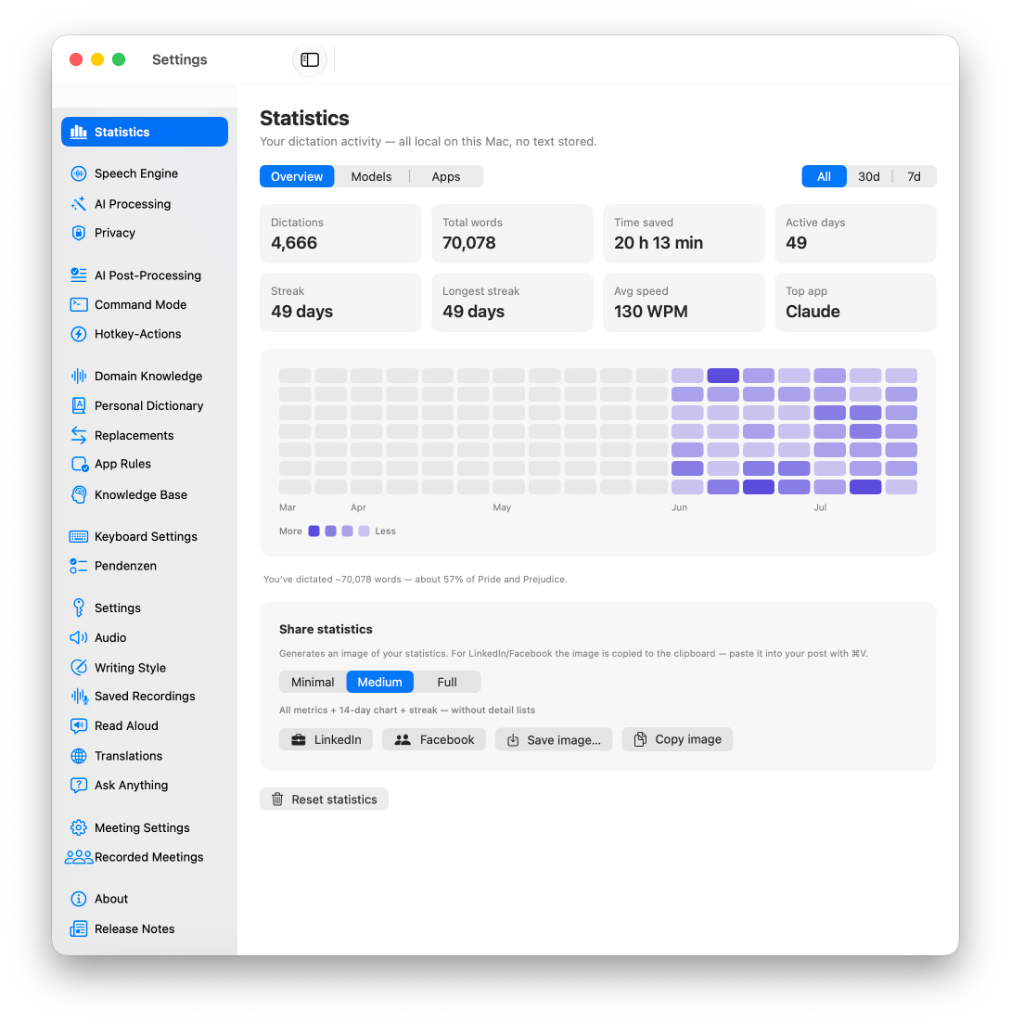
Dictations, words, time saved and streaks — computed locally on your Mac. Share a clean stats card without ever exposing your text.
Over 20 speech-to-text providers — cloud and fully local. Language hints, strict recognition and an EU server region for GDPR compliance.
Pick your AI provider — from the fastest cloud inference to Apple Foundation and MLX running entirely on your Mac. Temperature and reasoning are yours to tune.
One switch enforces local-only processing: speech recognition and AI stay on this Mac, nothing leaves the device. Turn it off and your previous providers return.
Every dictation is cleaned up before insertion. Screen name recognition reads the visible recipient and fixes the spelling — with an editing level you control.
Say the wake word and the AI decides: rephrase your last text or write something new. With its own hotkey, dedicated model and safety checks before replacing.
Build your own voice workflows: open a Perplexity search, draft an email, launch an app — each action becomes a tool the AI picks automatically.
Select text anywhere, press a shortcut: format as email, summarize, proofread, translate, improve, or turn an email into a task.
Teach Sophist your technical terms, products and colleagues' names — import and export included, plus a hotkey to add selected text from any app.
Spoken numbers, dates, times, currencies and units become clean notation — rule-based, no AI, no delay. Voice commands for new paragraphs or deletions work mid-dictation.
Fixed replacements keep names spelled right, and voice snippets insert whole text blocks — your address, a booking link — from a single trigger phrase.
Sophist detects the active app and switches speech provider and AI settings automatically — a precise tone for Mail and Outlook, something looser for chat apps.
Group apps into a rule via quick-pick or bundle ID, then choose the STT provider, the prompt mode and the AI provider that should apply there.
Drop your manuals, price lists and legal documents into folders — Sophist indexes them locally and searches them from any custom prompt.
Assign up to three hotkeys, each with its own language and AI mode, plus hold or toggle behaviour, auto-stop and a command palette.
Turn a dictation into a structured task, get due-date reminders, see urgent items in the menu bar — or let the AI create tasks for you. Just select the text of an email and press the Pendenz hotkey to turn it straight into a task.
The companion window keeps today's and overdue tasks in one calm list — searchable, filterable and a keystroke away while you work.
Choose how text lands in your document, and how much you see while dictating: live transcription preview, waveform, a status pill above the Dock.
Dictate into the middle of a sentence and capitalization and punctuation still fit. When an app exposes no text, a screenshot analysis fills the gap.
Set a microphone priority list, save filter presets, mute system audio while recording and pick the confirmation sound after insertion.
Recordings end on their own when you stop speaking, a wake word starts them, and a speaker gate makes sure only your voice keeps them alive.
Sophist learns how you write. Your recurring corrections guide the AI immediately, and a personal style adapter is trained locally on your Mac.
Have any text read back to you in high-quality voices, with a separate voice per language, adjustable speed, stability and similarity.
One hotkey turns dictation into translation: speak in any language, the translated text is inserted — live while you speak or via your AI model.
Press the hotkey, ask a question out loud, and the answer appears in a floating panel — with optional web search and a local history you can revisit.
Record Zoom or Teams calls with speaker detection, capture the other side's audio too, and get minutes, summaries and action items automatically.
See at a glance which macOS permissions are granted — and which open-source components Sophist builds on.
Every update is documented in the app: what's new, what's fixed, what got better — visible right where you work.
Field Notes
Videos & Tutorials
Why Professionals Choose Sophist
The AI speech to text app built for modern office workers on Mac. More than just dictation — Sophist is your voice-powered productivity assistant for emails, documents, and knowledge management.
Best-in-Class AI Dictation
Sophist uses the latest AI speech recognition models — both online (Soniox, ElevenLabs) and offline (Whisper, FluidAudio, Apple). Get accurate voice to text transcription in any language, in any app on your Mac.
3x Faster Than Typing
Stop typing emails, reports, and messages. With Sophist's AI dictation software, you speak naturally and get polished, professional text — instantly inserted wherever your cursor is.
Privacy-First Offline Dictation
Unlike other speech to text apps, Sophist offers fully offline dictation models. Your voice data never leaves your Mac. No cloud processing, no data sharing — complete privacy for sensitive business communication.
AI-Powered Voice Commands
Go beyond simple dictation. Sophist's Command Mode lets you write entire emails, summarize documents, and compose professional messages — all by voice. The perfect tool for sales teams, support agents, and busy professionals.
Built-in Knowledge Base (RAG)
Connect your documents — product manuals, legal references, technical specs — and access them by voice. Say 'Hey Anna' and Sophist retrieves exactly the information you need, woven directly into your text.
Works in Every App on macOS
Sophist works system-wide across all your Mac applications — from email clients and CRMs to Slack, WhatsApp, and code editors. One shortcut, universal voice to text dictation everywhere.
Looking for the best dictation app for Mac in 2025? Sophist is the AI-powered speech to text software designed for professionals who want to work faster. Whether you're looking for a SuperWhisper alternative, a Wispr Flow alternative, or a Willow Voice alternative — Sophist offers advanced AI dictation with offline privacy, voice commands, and a built-in knowledge base. Download Sophist for free and experience the future of voice to text on macOS.
Write faster
Up to 3x faster than typing. Dictate emails, notes, and protocols in seconds.
Better structure
Automatic formatting with paragraphs, lists, and headings via voice command.
More focus
Stay in flow. Reduce context switching and focus on what matters.